What is a proxy server, explained simply — and how it differs from a VPN
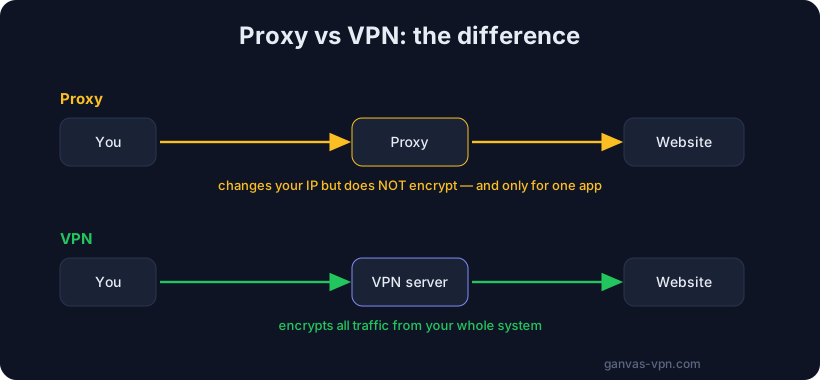
The word “proxy” shows up everywhere: in browser settings, in guides for unblocking websites, in ads for various services. But what a proxy server actually is — and how it differs from a VPN — isn’t obvious to most people. Let’s break it down without jargon: what a proxy is in plain language, the types you’ll run into, what a proxy can and can’t do, and when you should reach for a VPN instead.
A simple definition: a middleman between you and a website
Put simply, a proxy server is a middleman. Normally you connect to a website directly: your request goes straight to the site’s server, and the server replies to you. A proxy adds one more participant in the middle.
Imagine you want to buy something but don’t want to reveal your name and address. You ask a friend to place the order for you: they buy it under their name and then hand it over. The seller only ever sees your friend, not you. That “friend in the middle” is the proxy server.
Technically it works like this: your request goes to the proxy server first, the proxy forwards it to the website under its own name, gets the response, and passes it back to you. As a result, the website sees the proxy’s IP address instead of your real one. The word “proxy” literally means a representative — someone who acts on your behalf.
The key thing to remember right away: “a proxy server is a middleman” is almost the entire definition. A proxy swaps your visible address, but it doesn’t necessarily encrypt what you send. We’ll come back to that distinction, because it’s exactly what separates a proxy from a VPN.
The different types of proxy
Proxies come in many flavors, and that’s where a lot of confusion starts. Let’s sort them by a few traits.
By protocol: HTTP, SOCKS5, and transparent
HTTP proxy. The most common type. It understands the HTTP/HTTPS protocol and works mainly with web traffic — the stuff you open in a browser. An HTTP proxy “sees” the structure of web requests and can, for example, cache pages or filter content. For ordinary web browsing it’s usually enough.
SOCKS5 proxy. A more universal option. A SOCKS5 proxy doesn’t care what kind of traffic passes through it — it simply forwards any data: web, torrents, games, messengers, email. That’s why a SOCKS5 proxy is often the choice when you need to route more than just a browser through the middleman. SOCKS5 works with both TCP and UDP and supports username/password authentication. If you see a string like socks5://..., that’s it.
Transparent proxy. A special case: you might not even know it’s there. Transparent proxies are built into networks by ISPs, schools, offices, or public Wi-Fi owners. Your traffic passes through it automatically, with no setup on your end. This kind of proxy is usually used for filtering, statistics, or caching — and it doesn’t hide your address; on the contrary, it controls your traffic.
By access: public and private
Public proxies are open servers anyone can use. Lists of them are posted online for free. It sounds tempting, but in practice public proxies are slow, unstable, frequently drop, and — more importantly — insecure (more on that below).
Private proxies are servers only you, or a limited group of users, can access. They’re faster, more stable, and more predictable, because the load isn’t shared with thousands of random people. Private proxies usually cost money.
By IP origin: residential and datacenter
Datacenter proxies use IP addresses that belong to server hosting providers. They’re fast and cheap, but websites easily recognize such addresses as “not residential” — because ordinary people don’t browse the web from a datacenter. So they get blocked more often.
Residential proxies use IP addresses from regular home ISPs — the same kind real users have. They’re harder to tell apart from a live person, so they look more “natural,” but they cost more and are usually slower.
What a proxy does — and doesn’t do
This is where the biggest misunderstanding about proxies lives. Let’s be honest.
What a proxy does:
- Swaps your IP address. The website sees the proxy server’s address instead of your real one. If the proxy is in another country, the site treats you as if you’re there.
- Works narrowly, for one application. You can set up a proxy for just your browser or just one specific program, and let the rest of your traffic go directly. That’s handy when you only want to “disguise” a single app.
- Sometimes speeds things up and caches. Some proxies keep copies of frequently requested pages and serve them faster.
What a proxy does NOT do:
- It does not encrypt all your traffic. This is the crucial point. A plain proxy simply forwards data. If the connection to the site itself isn’t secured (or the proxy works over an unencrypted channel), the middleman and your ISP can see what you’re sending. HTTPS sites are protected on their own, but the proxy doesn’t add that protection — it doesn’t provide it.
- It does not cover the whole system. A proxy set up in your browser doesn’t protect other applications. A program that doesn’t know about the proxy will happily go online directly and expose your real address.
- It does not hide the fact of your activity from your ISP. Without encryption, your ISP can still see where your traffic is going.
In other words, a proxy changes the “return address on the envelope” but doesn’t seal the envelope itself. For comparison, we covered exactly what encryption gives you in our article What is a VPN, explained simply.
Proxy vs VPN: the key difference
Proxies and VPNs are often confused because both swap your IP. But the difference is fundamental, and it comes down to two things: encryption and system-wide coverage.
Here are the key differences:
- Encryption. A VPN builds an encrypted tunnel — nobody along the way can see the contents of your traffic. A plain proxy adds no encryption: it just relays data.
- Coverage. A VPN protects all the traffic of the entire system — every app, browser, and background service. A proxy usually works narrowly, for one application.
- Leak protection. A good VPN client watches for DNS leaks and can cut off the internet (a kill switch) if the tunnel drops. Proxies generally have no such mechanisms.
- Convenience. A VPN turns on with one button and protects everything. A proxy has to be configured in each app separately.
- Speed on a narrow task. A proxy can be slightly faster on a single task because it doesn’t spend resources on encryption. But that “saving” is exactly its weak spot from a privacy standpoint.
To boil it down to one sentence: a proxy changes your visible address, while a VPN changes the address and also encrypts all the traffic of the whole system. We’ve put together a detailed comparison with all the nuances on a dedicated page — VPN vs proxy: which to choose.
When a proxy makes sense, and when you need a VPN
A proxy isn’t a “bad” tool. It just has its own niche.
A proxy is a good fit when:
- You need to quickly switch the IP for one application — for example, to open a site that’s only available from another country, right in your browser.
- You’re handling technical tasks: testing a website from different regions, scraping, or checking geo-targeted ads.
- Speed on a specific task matters more than end-to-end encryption, and you trust the proxy itself.
A VPN is what you need when:
- You want to protect all of your device’s traffic, not just one application.
- You’re on public Wi-Fi in a café, airport, or hotel, where traffic is easy to intercept.
- Privacy from your ISP and DNS-leak protection matter to you.
- You want to turn protection on once and not configure each app by hand.
A rough rule of thumb: if the task is “show a website a different address in one app,” a proxy will do. If the task is “privacy and security for the whole device,” you need a VPN.
The risks of free proxies
Free public proxies deserve their own section, because the temptation is high and the risks are underrated.
By its very nature, a proxy server passes all your traffic through itself. That means the proxy’s owner can technically see where you go, and with unencrypted connections, what exactly you send. With a paid private service you at least know who you’re trusting. With a free public proxy you know nothing about the owner.
The main risks of free proxies:
- Logs. The owner can record which sites you opened and your real IP. Where those logs end up later is anyone’s guess.
- Data interception. A dishonest proxy can try to intercept or alter unencrypted traffic, inject ads, or harvest what you type.
- Instability. Public proxies constantly drop, lag, and change addresses, so you can’t rely on them as protection.
Remember: someone still pays for a free proxy. If you’re not paying with money, it’s worth at least understanding how the service makes its money. The same logic applies to free VPNs — we cover that on our Free VPN page, where we honestly explain how to go free and stay safe by using your own configurations.
How to check your IP and proxy
The simplest way to understand exactly what websites see is to look with your own eyes.
- Open the free My IP tool: it shows the address and country websites currently see. Turn on a proxy or VPN and compare the result before and after — that’s how you confirm the address swap actually works.
- If you use a VPN and want to check whether your real address is “leaking” around the tunnel, use the VPN Check tool.
These checks take a couple of seconds and clearly show the difference between “there’s a middleman” and “there’s no middleman.”
Short FAQ
Is a proxy the same as a VPN? No. Both swap your IP, but a proxy usually doesn’t encrypt traffic and works for one application, while a VPN encrypts all the traffic of the whole system. We covered how a proxy differs from a VPN above and on the VPN vs proxy page.
Does a proxy hide me completely? No. It swaps your visible IP, but without encryption your ISP and the proxy itself can see your activity. A proxy doesn’t give full anonymity — and neither does a VPN. For maximum anonymity, read our article Tor vs VPN.
Which is better for an ordinary user — a proxy or a VPN? For everyday privacy and security a VPN is almost always better: it protects the whole device with one button. A proxy is more of a tool for narrow and technical tasks.
What is a SOCKS5 proxy? It’s a universal proxy that forwards any traffic (not just web), supports TCP and UDP, and supports username/password authentication. People choose it when they need to route different applications through a middleman.
Are free proxies safe? Treat them with caution. You don’t know the owner, and they can technically see your traffic. The risk of logging and interception is real.
Bottom line
A proxy server is a middleman that swaps your visible IP address for one application. It comes in several kinds: HTTP and SOCKS5, public and private, residential and datacenter. A proxy is great for narrow tasks, but it has one important limitation: a plain proxy doesn’t encrypt all your traffic and doesn’t cover the whole system. That’s exactly why, when it comes to the privacy and security of the entire device, you need a VPN rather than a proxy — it encrypts your traffic and protects all your apps at once.
Want privacy without configuring every app by hand? Try GANVAS VPN — fast servers, full-traffic encryption, a kill switch, and DNS-leak protection. And if you already have your own configurations, you can add them for free.