What is a VPN, explained simply — and why you need one
If you’ve heard the word “VPN” but never quite understood what it actually means — this article is for you. No jargon, no marketing promises. We’ll explain what a VPN is in plain language, what it looks like in practice, why you need one, and where its abilities end.
A simple definition: a secure tunnel
VPN stands for Virtual Private Network. It sounds technical, but the idea behind it is genuinely simple.
Imagine sending a letter through the regular post. Anyone who handles the envelope along the way — the postal worker, the sorter, a random middleman — can read who you’re writing to and what you wrote. Now imagine that instead of an open envelope, you use a private armoured courier who carries your letter in a locked safe straight to its destination. Nobody along the route can see the contents, or even where you’re sending it.
That’s what a VPN is. It’s an encrypted tunnel between your device (phone, laptop, computer) and a special server on the internet. All of your internet traffic travels through that tunnel. From the outside, no one can see what’s inside.
Put even more simply: a VPN is a middleman that hides your traffic from prying eyes and swaps the address you appear to use on the internet.
What it looks like in practice: before and after
To understand what a VPN does, let’s look at what changes when you turn it on.
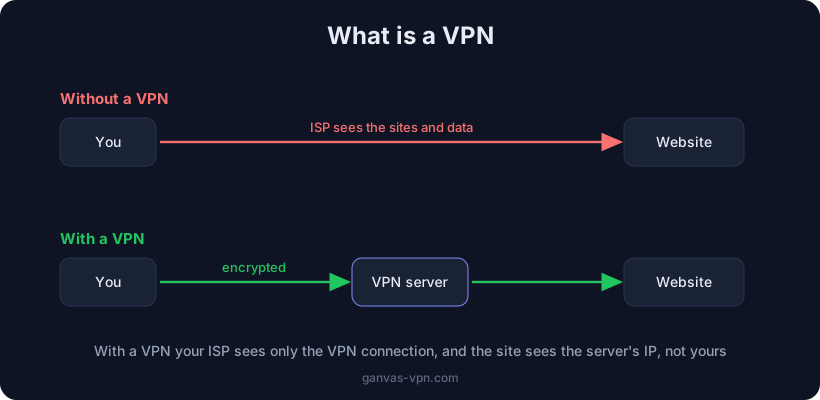
Without a VPN. When you open a website, your request goes straight through your internet provider. The picture looks like this:
- Your provider sees which websites you visit (by their domain names) and your real IP address — the unique number identifying your connection.
- The website you open sees your real IP address, and from it your rough location (city, country) and your provider.
- The owner of the Wi-Fi in a café or hotel can potentially peek at unencrypted traffic.
With a VPN. Now all your traffic first travels encrypted to the VPN server, and only from there to the website. The picture changes:
- Your provider only sees that you connected to a VPN server. Which sites you open inside the tunnel is hidden from it.
- The website sees the VPN server’s IP address, not yours. If the server is in another country, you appear to be there.
- The Wi-Fi owner sees only a stream of encrypted data that can’t be read.
You can check which address and country sites currently see with our free My IP tool — turn the VPN on and compare the result before and after.
Why you need a VPN
A VPN solves several practical problems. Not everyone needs all of them, but at least one usually applies to you.
Privacy from your provider
Without a VPN, your internet provider keeps a record of which websites you visit. In some countries, providers are required to store this data and hand it over on request. A VPN hides your list of sites from your provider — all it sees is a connection to an encrypted tunnel.
Safety on public Wi-Fi
Networks in cafés, airports, hotels and shopping centres are often poorly protected. On such a network, a technically savvy stranger at the next table might try to intercept your data. A VPN encrypts everything you send, so even on an open network your passwords and messages stay out of reach.
Access to sites and services
Sometimes a site or service isn’t available in your region — because of blocks or geographic restrictions. Since a VPN makes the website see the server’s address instead of yours, you can connect through a server in another country and get access.
Hiding your IP address
Your real IP is a trail that reveals your rough location and provider, and lets ad networks link your activity together. A VPN replaces your IP with the server’s address, and that trail goes cold.
For more on the scenarios where a VPN is especially useful, see our article Why you need a VPN.
What a VPN does NOT do
This is where it pays to be honest. There are a lot of myths around VPNs, and inflated expectations lead to a false sense of security.
A VPN does not make you fully anonymous. It hides your traffic from your provider and swaps your IP, but it’s not an invisibility cloak. If you log into your social media account, that platform knows perfectly well it’s you — VPN or not. Cookies, being signed into Google, and your browser’s “fingerprint” can also identify you. A VPN is a privacy tool, not absolute anonymity.
A VPN does not replace an antivirus. The tunnel encrypts traffic in transit, but it doesn’t scan files for viruses and won’t stop malware you downloaded and ran yourself. If you click a phishing link and type in your password, a VPN won’t help. It protects the connection, not your judgement.
A VPN doesn’t protect you from your own actions. If you willingly hand data to a scam site or enable location sharing in an app, a VPN won’t undo that.
If you want maximum anonymity rather than just privacy, it’s worth understanding the difference between a VPN and Tor — see our article Tor vs VPN.
How to choose a VPN
There are many VPN services and they vary a lot. Here’s what to look at first:
- A no-logs policy. A good VPN doesn’t keep records of what you do. Otherwise the whole point of privacy is lost — you simply move your trust from your provider to the VPN service. It’s ideal when you can also connect using your own configurations.
- Modern protocols. A VPN’s “engine” determines speed and resistance to blocking. Today the relevant ones are WireGuard (fast), OpenVPN (proven) and VLESS+Reality (for getting past heavy filtering). We compared them in detail in VPN protocols compared.
- A kill switch. This feature cuts your internet if the VPN suddenly drops, so your real IP and traffic don’t “leak” outside the tunnel. Without it, a dropped connection can expose you.
- DNS leak protection. Even with a VPN on, domain lookups sometimes slip outside the tunnel. A good client controls this.
- Be careful with “free.” Completely free VPNs make money some other way — sometimes by selling your data or showing ads. That doesn’t mean free is always dishonest, but you should understand how the service pays for itself.
How to get started with GANVAS VPN
If you want to try a VPN without complicated setup, here’s the simple path:
- Download the app. GANVAS VPN is available for Windows and other platforms — see the VPN for Windows page. Installation takes a couple of minutes.
- Connect in one click. The app picks a suitable server and protocol for your network automatically — no need to mess with configs.
- Use your own configs for free. If you already have your own VPN configurations (WireGuard or VLESS), GANVAS lets you add them and use them free of charge. Details on the Free VPN page.
- Check the result. Open My IP and confirm that the server’s address is shown, not your real one.
A short FAQ
Is it legal? In most countries, using a VPN is completely legal — it’s an ordinary privacy tool used daily by millions of people and businesses. A few countries restrict VPNs. The VPN itself is legal, but it doesn’t make illegal activity legal — you’re still responsible for what you do online.
Is it free? It varies. With GANVAS you can connect your own configurations for free. Be cautious with fully free “all-inclusive” services: running servers costs money, and if you’re not paying, it’s worth understanding how the service makes money.
Does a VPN slow down the internet? A little — yes. Traffic travels through an extra server and gets encrypted, so a small speed loss is unavoidable. But with modern protocols like WireGuard and a nearby server, the difference is often barely noticeable. Sometimes a VPN even helps, if your provider artificially throttles certain services.
Do I need a VPN if I have “nothing to hide”? Privacy isn’t about hiding something — it’s about deciding for yourself who gets to see your life. Even people who do nothing wrong put curtains on their windows.
Summary
A VPN is an encrypted tunnel that hides your traffic from your provider and network owners and swaps out your IP address. It’s excellent for privacy, safety on public Wi-Fi, and access to sites. But it isn’t a magic anonymity button or a replacement for an antivirus — treat it as one tool of digital hygiene, not a cure-all.
Ready to try it? GANVAS VPN — fast servers, modern protocols, a kill switch, DNS leak protection, and support for your own configs free of charge.