What Is an IP Address, Explained Simply
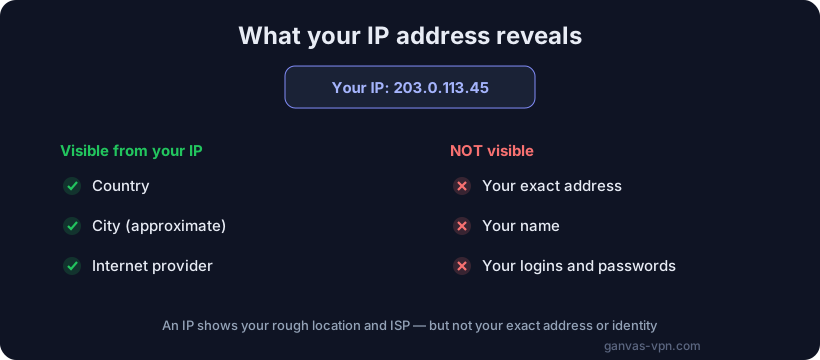
The phrase “IP address” is everywhere — in your router settings, in setup guides, in news about surveillance and blocking. But what actually is it? In this article we’ll explain what an IP address is in plain language: how it looks, the difference between a public and a local IP, what can genuinely be learned about you from it — and we’ll bust the biggest myth, that anyone can find your home from your IP. No jargon, no scare stories.
A simple definition: your address on the network
To understand what an IP address is, the easiest comparison is regular postal mail. For a letter to reach you, the envelope needs an address: a city, a street, a building, an apartment. Without an address, the mail carrier simply has no idea where to take it.
The internet works in a very similar way. Every device that goes online — your phone, laptop, smart speaker, the server behind any website — needs its own address. Otherwise there would be nowhere to deliver the data. That address is called an IP address (IP stands for Internet Protocol).
When you open a website, your device essentially says: “Hi, I’m at this address, please send the page here.” The website receives your request, sees the return address, and sends the answer back to you specifically — not to the millions of other users online. An IP address is, in effect, the return address on a digital envelope.
In the shortest possible terms: an IP address is the unique number of your internet connection at a given moment. It’s how data finds its way to you and back again.
What an IP address looks like
There are two kinds of IP addresses — an older one and a newer one. They’re called IPv4 and IPv6.
IPv4 — the familiar format
The most familiar kind of IP address is four numbers separated by dots. For example:
192.168.1.1
93.115.172.244
8.8.8.8
Each of the four numbers can be anything from 0 to 255. This is the IPv4 format — the fourth version of the Internet Protocol, in use since the dawn of the mass internet. These are the addresses you’ll most often see in your router or Wi-Fi settings.
IPv4 has one problem: there are only about 4.3 billion possible combinations. That once seemed like an endless amount, but the number of devices in the world grew far beyond it — phones, TVs, cameras, light bulbs, cars. The addresses started to run out.
IPv6 — the new format
To solve the shortage, a new version was created: IPv6, the sixth version of the protocol. It looks longer and less familiar:
2001:0db8:85a3:0000:0000:8a2e:0370:7334Instead of four numbers, there are eight groups of characters separated by colons, and it uses letters as well as digits. In return, IPv6 offers so many addresses that there’s effectively one for every grain of sand on the planet — running out is not a concern for a very long time.
For an everyday user, the difference is small: both formats are simply the address of your device on the network. Many providers today use both at once. You certainly don’t need to memorize an IPv6 address — that’s the machine’s job.
Public and local IP addresses
This is where it gets interesting, and where many people get confused. In reality you usually have two different IP addresses, and they do different jobs.
The local (private) IP
Picture a large office building with a single street address. Inside the building, each room has its own number so the courier knows where to take a package once they’re inside. But from the outside, the whole office is just one address on the street.
Your home works the same way. Your router shares the internet with all your devices, and inside your home network each device has its own local IP address. They usually look like this:
192.168.0.2
192.168.1.5
10.0.0.3
These addresses are only visible inside your home network. Your neighbor’s router uses exactly the same 192.168.x.x range, and that’s fine — they never clash, because each is locked inside its own network. These addresses aren’t visible from the internet and say nothing about you.
The public IP
The public IP address, on the other hand, is the single shared address of your home or office, assigned by your internet provider. This is the one every website you visit sees. It’s the “address on the building” under which your entire home goes out onto the wider internet.
When people say “find my IP” or “change my IP,” they almost always mean this public address — the one websites and services see. You can check your current public IP with our free What Is My IP tool — it shows the address the whole internet sees right now.
What can really be learned from your IP
This is the most important section, because it attracts the most myths and fear. So let’s be honest about what your IP address actually reveals — and what it doesn’t.
What can be learned:
- Your country. This is almost always accurate.
- Your region and city. Usually correct, but not perfect — sometimes it shows a nearby major city, or the city where your provider’s network node sits.
- Your internet provider. It’s visible which company’s service you use.
- Your connection type. Sometimes it’s possible to tell home internet apart from mobile, or from a data center.
What CANNOT be learned:
- Your exact home address. Here’s the big myth that needs busting. An IP address cannot reveal your street, building, or apartment. IP geolocation only points to an approximate area — usually accurate to the city, and often off by tens of kilometers. The movie scenes where someone is “traced by IP” to a doorstep bear almost no resemblance to reality.
- Your name. An IP address contains no personal data. Only your provider, who holds your contract, can link an address to a specific person — and only in response to an official, lawful request.
- What you do online. On its own, an IP doesn’t reveal your browsing history.
Want to test this for yourself? Use the IP Lookup tool — enter any address and see what data it actually reveals. Most likely the city will be approximate, and there’ll be nothing close to a precise address.
The takeaway is simple: an IP shows your country, rough city, and provider — but not your apartment and not your name. It’s meaningful, but fairly general, information.
Dynamic vs. static IP — in brief
A quick note on the fact that a public IP comes in two types.
- A dynamic IP changes from time to time on its own — your provider hands you a new address from its pool when you reconnect, or simply on a schedule. This is how most home users are connected.
- A static IP is fixed to you permanently and doesn’t change. It’s usually a paid service, needed for servers, security cameras, or remote access.
If you want to understand the difference and which is better for you, read our separate article on Dynamic vs. Static IP.
Why hide your IP, and how
Since your IP reveals your country, rough city, and provider, many people reasonably want to hide that trail. The reasons vary:
- Privacy. You may not want every website logging your address and tying your activity to it for advertising.
- Safety on public networks. In cafés and airports, you’d rather not expose extra data.
- Access to sites. If a resource is restricted by region, changing your visible address helps.
The simplest and most reliable way to hide your IP is a VPN. In short, a VPN routes all your traffic through an encrypted tunnel to its server, so websites start seeing that server’s IP address instead of your real one. Your true address and provider stay hidden.
For a full explanation of what a VPN is and how it works, see our article What Is a VPN. And for every practical way to hide your address — with the pros and cons of each — see our guide How to Hide Your IP Address.
Short FAQ
Is my IP address visible to websites? Yes. The moment you open a site, it sees your public IP address — otherwise it couldn’t send you the page. That’s a normal part of how the internet works. You can hide your real address from websites with a VPN: they’ll then see the VPN server’s address instead. Check which IP is visible right now on the What Is My IP page.
Can a person be identified by their IP address? Not by an ordinary user. An IP shows only country, rough city, and provider — not a name and not an exact address. Technically, only the provider itself can link an IP to a specific person, and only in response to an official, lawful request. So a random stranger online cannot trace your apartment “by IP” — that’s a myth.
What can really be learned from an IP? Your country (almost always accurately), your approximate region and city (sometimes off by tens of kilometers), your internet provider, and your connection type. Your exact home address, your name, and your activity history cannot be learned from an IP.
How do I change my IP address? There are a few ways. A dynamic address sometimes changes by itself after you reconnect the router. But the most reliable and controllable method is to turn on a VPN: your visible IP instantly switches to the address of a server you choose, even in another country. Details in How to Hide Your IP Address.
Do I really have two IP addresses? Most often, yes: a local (private) one for the devices inside your home network, and a public one shared for going out onto the internet, which websites see. When it comes to privacy, it’s the public one that matters.
Summary
An IP address is the address of your device on the network, the thing that lets data find its way to you. It comes in the familiar IPv4 format (192.168.x.x) and the newer IPv6. You usually have a local address for your home network and a public one that websites see. From your public IP, someone can learn your country, rough city, and provider — but not your exact address and not your name: that’s a common myth. If you want to hide your trail online, the simplest way is a VPN.
Want to hide your IP in one click? Try GANVAS VPN — fast servers, modern protocols, and support for your own configs for free. And you can check the result right away on the What Is My IP page.