How a VPN Works: The Principle Explained in Plain Language
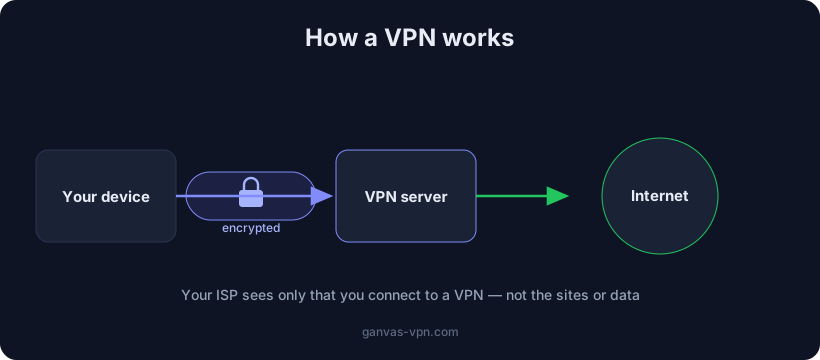
Everyone has heard the word “VPN,” but what actually happens when you press “Connect” usually stays a mystery. It can feel like magic — after which your ISP stops seeing you and websites think you’re in another country. In reality there’s no magic at all, just a clear mechanism made of three simple parts. Let’s break down how a VPN works and why it changes the picture so dramatically.
The big picture: tunnel, encryption and intermediary server
To understand how a VPN works, three words are enough: tunnel, encryption, intermediary.
- The tunnel is a protected channel between your device and the VPN server. All your traffic travels inside it instead of going straight to the internet.
- Encryption turns your data into an unreadable stream. Anyone who intercepts the traffic along the way sees only meaningless “noise.”
- The intermediary server is a machine run by the VPN provider through which your traffic exits to the internet. Websites see its address, not yours.
In short: normally your device talks to the internet directly, and everything on that path (your ISP, the Wi-Fi owner) can see where you’re going. A VPN inserts an encrypted tunnel and an intermediary server into that chain. Your ISP now only sees that you’ve connected “to something,” and websites see the server instead of you. That’s essentially the whole answer to how does a VPN work — the rest is just detail.
Step by step: what happens to your traffic
Let’s follow a single request — say, you open a website. Without a VPN it’s simple: device → ISP → internet → website, and at every step it’s visible where you’re going. With a VPN the path changes.
Step 1. Your device. The VPN app on your computer or phone creates a virtual network adapter. From that moment, all outgoing system traffic is routed not straight to the network but into this adapter — that is, into the tunnel.
Step 2. Encryption. Before it leaves your device, each data packet is sealed: the contents are encrypted, and a new “envelope” addressed to the VPN server is added on top. The original destination address (the website you’re heading to) is hidden inside the encrypted part. From the outside, only the fact that the packet is flying to the VPN server is visible.
Step 3. The VPN server. The encrypted packet reaches the intermediary server. The server is the only link that holds the key to decrypt it. It removes the outer envelope, sees the real destination address and forwards the request onward to the internet — now under its own name and from its own IP.
Step 4. The internet and the website. The website receives the request as if it came from the VPN server. It replies to the server’s address, because it simply doesn’t know your real one.
And back again. The website’s reply arrives at the VPN server, which wraps it back into the encrypted tunnel and sends it to your device. The VPN app decrypts the packet and hands it to your browser. To you it all looks like ordinary internet — except now it travels through a protected channel.
This whole cycle repeats for every packet and takes a fraction of a second. That’s exactly why a well-configured VPN is barely noticeable in everyday use.
What changes: who sees what now
The main benefit of a VPN becomes obvious when you compare who observes what before and after connecting.
Your ISP (or the Wi-Fi owner) previously saw the list of domains you reach and could use it to build a profile or block sites. After you turn on a VPN, it sees exactly one thing: your device holding an encrypted connection to the VPN server. One address, one stream of encrypted data. No domains, no specific pages — provided the tunnel is airtight and there are no leaks (more on that below).
Websites and services used to see your real IP address — and from it roughly your city and ISP. Now they see the VPN server’s IP. If the server is in another country, the website acts as if you’re located there. This is exactly how a VPN helps bypass geographic restrictions.
It’s very easy to check this difference: look at your address with the My IP tool before and after connecting — you’ll see it switch to the server’s address.
It’s worth being honest: a VPN doesn’t make you fully anonymous. Part of your trust now shifts to the VPN provider itself — your traffic passes through its server. So choosing a provider you trust matters no less than the encryption itself.
The role of protocols: how the tunnel is actually built
The tunnel is the idea; a protocol is its concrete implementation. The protocol defines exactly how the connection is established, how data is encrypted and how it’s packed into packets. Your choice of protocol affects speed, battery drain and the ability to slip through filtering. Three protocols dominate today:
- WireGuard — modern and very fast. Compact code, low latency, instant reconnection when you switch networks. An excellent default where traffic isn’t filtered aggressively. The downside: it has a recognizable “fingerprint,” so on networks with deep packet inspection (DPI) it’s sometimes blocked.
- OpenVPN — the time-tested classic. Flexible, can run over TCP on port 443 and therefore disguises itself as ordinary HTTPS better. Reliable and compatible with almost everything, but heavier and slower than WireGuard.
- VLESS+Reality — an approach for networks with active blocking. Reality imitates a genuine TLS handshake to a popular website, so to a filtering system the traffic looks like a visit to a major site rather than a VPN. This helps where WireGuard and OpenVPN get cut.
If you want to dig deeper, we have a detailed comparison of VPN protocols — what to pick for speed, for an old device and for harsh blocking. In practice it’s most convenient when the app picks the protocol for your network itself, so you never touch a config file.
Encryption and the tunnel in plain words
“Tunnel” is a metaphor, and it works. Imagine you send a postcard: the mail carrier, the sorter, anyone along the way can read the text and see the address. Now imagine you place that postcard into an opaque, armored pipe that leads straight to a trusted person on the other side of the city. No one along the route sees the contents or the final destination — only that the pipe runs to that person. The VPN tunnel is that pipe, and encryption is its walls.
On the technical side, a modern VPN uses strong algorithms (such as AES or ChaCha20) and a key-exchange protocol in which your device and the server agree on a secret key in a way that an eavesdropper can’t reconstruct, even while watching the exchange. Every packet is encrypted with that key. Intercepting the traffic is technically possible — but without the key it’s just a stream of random bytes. That’s exactly why public Wi-Fi in a café or airport stops being a threat: even if someone is listening on the network, they only see an encrypted tunnel.
For a layer-by-layer breakdown of who sees what — with HTTPS, DNS and a VPN — see our article on how to encrypt your traffic.
DNS through the tunnel, the kill switch and leak protection
An encrypted tunnel is only as useful as it is airtight. There are a few places where traffic can “leak” around the tunnel, and a good client closes all of them.
DNS inside the tunnel. Before opening a site, your device asks a DNS server: “what’s the IP for this domain?” If that request goes around the tunnel — straight to your ISP — then the list of your sites leaks even if all the rest of your traffic is encrypted. A properly configured VPN wraps DNS requests inside the tunnel too, so your ISP can’t see which domains you open. What a DNS leak is and why it happens even with a VPN on, we covered in a separate article.
The kill switch. If the connection to the VPN server suddenly drops, by default your system will try to reach the internet directly — and in that very second it exposes your real IP. A kill switch instantly blocks all traffic when the tunnel breaks, until the connection is restored. Without it, even a brief drop undoes all your protection.
IP leak protection. There are two classic ways around the tunnel. The first is WebRTC: the browser’s video-call technology can learn your real IP directly via JavaScript. The second is IPv6: if the VPN only wraps IPv4 while your ISP hands out IPv6, some traffic can escape in the clear. Good clients mute both vectors. It’s worth checking yourself — with the WebRTC leak test: if your real address shows up there, the tunnel is leaky.
How it’s implemented in GANVAS
GANVAS VPN is everything described above, assembled to work out of the box:
- An encrypted tunnel for all traffic — your ISP only sees the fact that you connected to a server.
- WireGuard and VLESS+Reality — a fast protocol by default and a disguising transport where ordinary VPNs are blocked. Switch between them in a couple of clicks.
- DNS inside the tunnel and protection against multi-homed leaks on Windows — your list of sites doesn’t reach your ISP.
- Kill switch and DNS/IP leak protection enabled by default.
- Your own configs, for free. If you want to use a ready-made config in another client, GANVAS hands it over at no extra charge.
You can start for free — take a look at the free VPN.
Short FAQ
Does a VPN make me fully anonymous? No. A VPN hides your traffic from your ISP and your IP from websites, but the traffic passes through the VPN provider’s server, to which you entrust some of your data. For maximum anonymity there’s Tor, which routes traffic through a chain of nodes.
Does a VPN slow down the internet? A little — traffic is encrypted and goes through an extra server. On a modern protocol like WireGuard with a nearby server, the slowdown is usually almost unnoticeable.
Can my ISP see that I’m using a VPN? It can usually see the fact of a VPN connection (one encrypted stream to one address), but not what you do inside the tunnel. Transports like VLESS+Reality disguise even the fact that a VPN is being used.
Does a VPN protect against viruses? No. A VPN is about channel privacy and swapping your IP, not antivirus. They’re different tools.
Can I watch content from another country? Often yes — websites see the server’s IP, so by connecting to a server in the country you want, you “appear” to be there.
Summary
Now it’s clear how a VPN works: your device raises an encrypted tunnel to an intermediary server, all traffic travels inside it, the server sends requests to the internet under its own name and returns the replies back. Your ISP only sees the connection to the VPN, websites see the server’s address, and the contents are securely hidden by encryption. The protocol determines speed and resistance to blocking, while DNS through the tunnel, the kill switch and leak protection keep the picture airtight.
Want to try it all in practice? Connect GANVAS VPN, check your new address with My IP, and confirm there are no leaks with the WebRTC test.