What a DNS leak is and how to close it
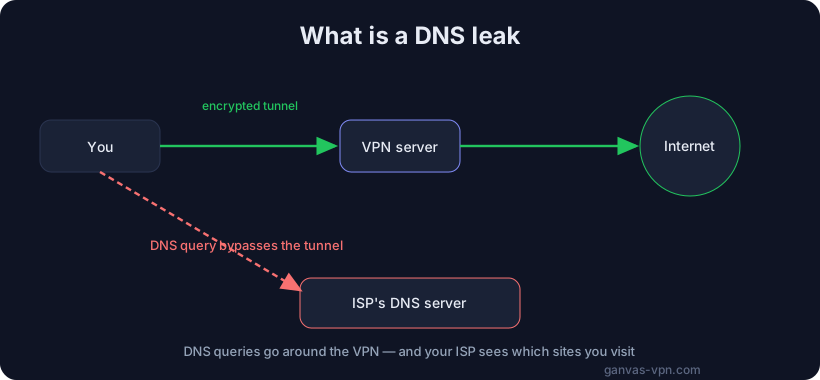
You turn on your VPN, the indicator glows green — looks like everything’s fine. But there’s a quiet problem that undoes your privacy: a DNS leak. Because of it, your internet provider still sees which sites you open, even though the rest of your traffic goes through the tunnel.
What DNS is and where the leak comes from
DNS (the Domain Name System) is the internet’s “phone book.” When you type a site’s address, your device first asks a DNS server for its IP. If that request goes directly to your provider’s server instead of through the VPN, you get a DNS leak.
The result: your traffic is encrypted, but the list of sites you visit leaks out in the clear. Your provider (or the Wi-Fi owner) sees your requests even if they can’t see the contents.
Why it happens:
- The OS sometimes sends DNS requests by a “fast” path that bypasses the tunnel.
- On Windows, requests can go out across several network adapters at once (multi-homed).
- A broken or custom VPN config doesn’t set its own DNS server.
Why it’s dangerous
- Your provider sees your sites — the whole point of a VPN is lost.
- Profiling and ads — DNS makes it easy to build a history of your interests.
- Unblocking breaks — if the request goes to your provider, it can tamper with the answer and keep you off a site.
So a DNS leak isn’t a minor detail — it’s a hole in the very privacy you turned the VPN on for.
How to test and close it
Testing is simple. Connect to your VPN and run our VPN check — it shows which DNS server your requests go through. If you see your provider’s servers instead of the VPN’s, there’s a leak. While you’re at it, also run the WebRTC leak test: the browser can reveal your real IP around the tunnel.
What to do:
- Choose a VPN with built-in DNS-leak protection and a kill switch.
- On Windows you need protection against multi-homed resolving — serious clients do this on the app side.
- Don’t hand-edit DNS in custom configs unless you’re sure — let the VPN set it.
Bottom line
A DNS leak is invisible, but it’s the most common way your history slips past the VPN. The good news: it takes a minute to test and is just as easy to close with the right client. For how protocols affect unblocking, see our VPN protocols comparison.
GANVAS VPN routes DNS inside the tunnel and closes multi-homed leaks on Windows. Try GANVAS VPN — privacy without holes and DNS-leak protection.