What Is DPI (Deep Packet Inspection) and How to Get Around It
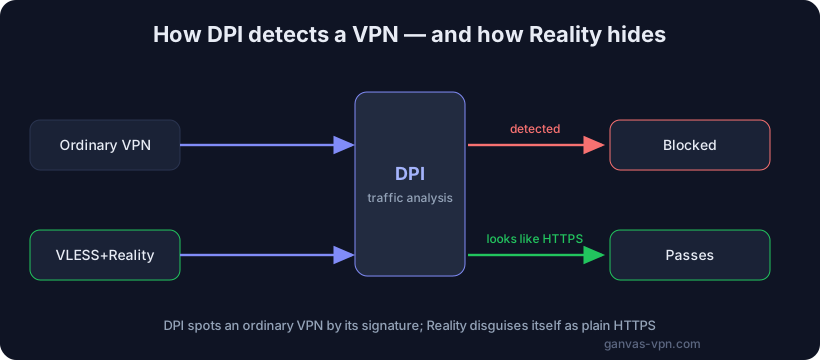
You know the feeling: a site is “kind of there” but won’t load. The domain resolves, the ping goes through, yet the page hangs on an endless spinner or dies halfway. A messenger says “connected,” but messages never send. A video starts and instantly freezes. Most of the time this isn’t a broken connection or “bad internet” — it’s DPI, deep packet inspection. Let’s break down what DPI is in plain words, how it spots an ordinary VPN, and what actually helps you get around DPI blocking.
Why a site “seems to exist but won’t load”
When a provider simply blocks an address, you get an honest error: “site unavailable,” a dropped connection, a block page. That’s crude IP- or domain-based blocking — you can see it immediately.
DPI is subtler. The connection technically establishes, but then the system starts interfering with the data exchange: it injects forged reset packets, throttles the channel to an unusable crawl, or kills the session a couple of seconds after it starts. From the outside it looks like “the internet is glitchy,” when in fact the traffic is being deliberately filtered. That very ambiguity is the calling card of DPI: it sort of works, but it’s impossible to use.
What DPI is in plain words
An ordinary network device only looks at the “envelope” of a packet: where it came from and where it’s going (IP addresses and ports). It doesn’t care what’s inside. DPI, on the other hand, opens the envelope and looks at the contents — or more precisely, at the structure of the traffic.
Deep packet inspection lets a provider (or a filtering system run by a country or organization) determine:
- Which protocol this is — ordinary HTTPS web traffic, a video call, a torrent, a VPN, or Tor.
- Where the connection is actually going — even if the address is masked, the TLS handshake often reveals the target domain (the SNI field).
- How the stream behaves — packet sizes, timings, the rhythm of the exchange.
A key point: DPI doesn’t necessarily read the content itself. Modern traffic is encrypted, and the provider can’t decrypt it on the fly. But it doesn’t need to. It’s enough to identify the type of traffic from indirect signs — and then decide: pass, throttle, or drop. It’s like a guard who never opens the parcel, but reads its shape, weight, and label, figures out what’s inside, and decides whether to let it through.
How DPI spots an ordinary VPN
This is where the core problem with classic VPNs lies. Encryption hides the content of your traffic, but it doesn’t hide the fact that it’s a VPN. Every protocol has a recognizable “fingerprint” — a signature.
- WireGuard is fast and modern, but its handshake has a recognizable structure and fixed sizes for the first packets. DPI spots it from literally the first bytes of the session.
- OpenVPN, even in TLS mode, leaves characteristic connection-setup patterns that give it away.
- IKEv2/IPSec runs over specific ports and protocols that are easy to single out and cut off entirely.
DPI is tuned to these signatures. The system doesn’t know which sites you’re opening inside the tunnel — but it sees “this is a VPN” and applies a rule: throttle or drop. That’s why, on networks with active DPI, a “bare” VPN often connects, shows a green indicator, and then dies a few seconds later. Encryption alone won’t save you here — the traffic also needs to not look like a VPN.
What helps against DPI
The logic of getting around DPI has changed. It used to be about hiding the content (encryption). Now it’s about hiding the very fact that you’re circumventing anything. The traffic has to dissolve into the ordinary web stream. Here’s what does that.
Obfuscation
Obfuscation “scrambles” traffic so that it has no recognizable signature. The stream becomes a blob of data with no characteristic fingerprint: DPI looks at it and can’t confidently say “this is a VPN.” Obfuscation comes in many forms — from wrapping VPN traffic in an extra layer to fully mimicking other protocols.
VLESS + Reality — disguised as ordinary HTTPS
Today this is one of the most resilient answers to DPI. VLESS is a lightweight transport that carries no rigid fingerprint of its own. Reality is a technology layered on top of it that imitates a genuine TLS handshake to a real, popular website (a major CDN, for example).
The key difference from older disguises: Reality doesn’t forge a certificate or stand up its own fake TLS — it borrows the handshake of a real third-party site. To DPI, your connection looks like an ordinary visit to a large, legitimate resource over HTTPS — exactly like the ones millions of other users make. You can’t block this “by signature” without blocking the entire normal web along with it. For more on how the protocols differ, see VPN protocols compared.
obfs4 bridges — for the Tor network
If you use Tor, your provider often knows and blocks its public entry nodes. obfs4 bridges solve this: they’re unannounced entry points with obfuscation that strips Tor’s characteristic signs. DPI looks at this traffic and sees no Tor “fingerprint” — so it can’t block it by signature.
Port 443
Port 443 is the port that carries all the HTTPS traffic in the world. Blocking it outright is impossible — it would switch off the internet. So circumvention tools that disguise themselves as HTTPS on port 443 are much harder to cut off “crudely” by port number. DPI has to analyze the contents of the stream instead, and if those are indistinguishable from ordinary HTTPS, there’s nothing to latch onto.
Step by step: what a user should do
If you’ve hit the “seems to work but won’t load” wall, work through this in order.
- Confirm it’s actually DPI, not plain blocking. If a site returns an honest “unavailable” error, that’s IP/domain blocking, and an ordinary VPN may be enough. To check whether a domain is on a blocklist, use our blacklist checker.
- Don’t use bare WireGuard on a DPI network. It’s fast but easily identified. Save it for free networks.
- Switch to a protocol with disguise. VLESS+Reality is the priority where VPNs get cut: the traffic looks like ordinary HTTPS.
- Use port 443. HTTPS-style disguise on the standard port is more resilient to crude port-based blocking.
- If even that gets cut, turn on Tor mode with obfs4 bridges. This is the next line of defense when regular tunnels don’t get through.
- Try different servers. Blocks are often targeted: a neighboring server or a different exit country may work fine.
- Check for leaks. A blocked resource can still “see” your real IP through a WebRTC leak or your actual address, even when the main tunnel is fine. For a full unblocking checklist, see how to unblock websites.
Why GANVAS
GANVAS VPN was built for getting around DPI from the start — not the other way around.
- VLESS+Reality against DPI. The primary mode disguises your traffic as ordinary HTTPS to a legitimate site, leaving DPI nothing to grab.
- Your own configs, free. You can get personal configurations and connect without being tied to a single app.
- Tor mode with bridges. When even disguised tunnels don’t get through, one tap turns on Tor with obfuscated bridges.
- Fast protocol and server switching. No need to dig through settings by hand — change modes in a couple of taps.
For more on the mechanics of circumvention, see the in-depth guide how to bypass blocks. Or start with the free VPN.
Quick FAQ
Does DPI read my messages and passwords? Usually not. DPI doesn’t decrypt encrypted HTTPS traffic. It identifies the type of traffic from indirect signs (structure, timings, the SNI field) rather than reading the content. But the fact that you’re contacting a given domain, and the protocol type, are visible to it.
If I have a good VPN, DPI can’t touch me? It depends on the protocol. WireGuard, OpenVPN, and IPSec have recognizable signatures, and DPI spots them regardless of how good the service is. What saves you isn’t “a good VPN” in general, but a protocol with disguise — such as VLESS+Reality.
Why is VLESS+Reality better than an ordinary VPN against DPI? It doesn’t try to hide the fact of encryption (that’s impossible anyway); it makes the traffic indistinguishable from an ordinary visit to a major site over HTTPS. You can’t block that “by signature” without breaking the normal web.
Is getting around DPI legal? Circumvention and encryption tools are, in themselves, privacy technologies. But rules for accessing resources differ by country and organization. Follow your local laws and the terms of your network.
Does just changing DNS help? Sometimes — against the simplest DNS-based blocks. But against real DPI, changing DNS is useless: the filtering works on the content and behavior of the traffic, not on who resolves the names.
The bottom line
DPI isn’t magic, and it isn’t “bad internet.” It’s a technology that identifies the type of your traffic from indirect signs and decides its fate: pass, throttle, or drop. It spots an ordinary VPN by its signature, so encryption alone is no longer enough. What works is whatever dissolves your traffic into the ordinary web: obfuscation, VLESS+Reality on port 443, and obfs4 bridges for Tor.
Try GANVAS VPN — modern protocols against DPI, your own configs for free, and Tor mode with bridges. Switching between them takes a couple of taps.