IPv4 vs IPv6 — the Difference, Explained Simply
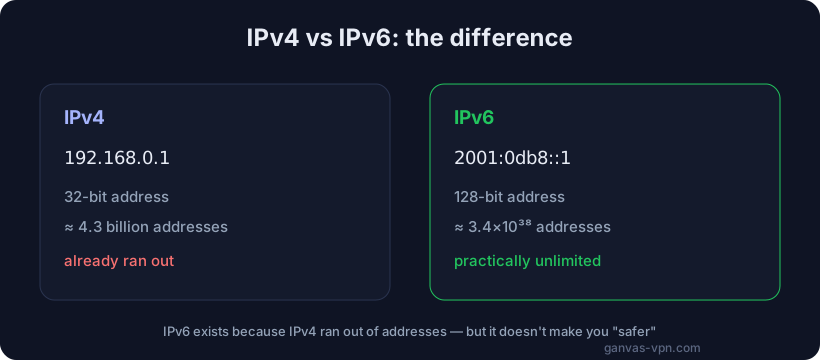
If you’ve ever opened your router settings or checked your address online, you’ve probably seen two odd-looking strings: one like 192.168.0.1, and another long one full of colons and letters. Those are two formats of the same thing — an IP address. The old one is called IPv4, the new one IPv6. In this article we’ll explain the difference between IPv4 and IPv6 in plain language: how they look, why a new version was needed at all, what the real differences are — and, honestly and without exaggeration, the truth about myths like “IPv6 is safer.”
Why IPv6 was needed in the first place
To understand the point of having two versions, start with the basics: an IP address is a device’s address on the network, the label that data uses to find its way to it. It’s like the address on an envelope: without it, a page, a video, or a message simply wouldn’t know where to come back to. If that still sounds fuzzy, we have a separate article on what an IP address is that covers the fundamentals from scratch.
The problem is that there have to be enough addresses to go around. When the internet was young, engineers chose a format that holds about four billion addresses. In the 1980s that sounded like a number out of science fiction — there were only thousands of devices online. But then came home computers, smartphones, tablets, smart TVs, cameras, speakers, light bulbs, internet-connected cars. Today a single person can easily rack up five to ten devices online. Four billion addresses for eight billion people simply wasn’t enough.
That’s exactly why IPv6 was invented — a new version of the protocol with a nearly infinite supply of addresses. The old version, IPv4, hasn’t gone anywhere and is still running. The world is currently in a transition period where both versions exist side by side. Let’s look at each in turn.
IPv4 — the familiar format
IPv4 (Internet Protocol version 4) is the fourth version of the protocol, the one the internet has run on since the start of the mass-adoption era. An address in it looks like four numbers separated by dots:
192.168.0.1
93.115.172.244
8.8.8.8
Each of the four numbers can range from 0 to 255. Under the hood that’s four bytes — 32 bits of information. Multiply out all the possible combinations and you get roughly 4.3 billion addresses (2 to the power of 32). Sounds like a lot, but by modern standards it’s small.
Why IPv4 addresses ran out
IPv4 addresses have officially run out — the regional internet registries handed out the last free blocks one after another back in the previous decade. There’s simply nowhere to get new ones: the space is finite, and it’s exhausted.
A few tricks keep things working. The main one is NAT (Network Address Translation). Thanks to NAT, your whole home — laptop, phone, TV — gets online under a single shared external address, while inside the network each device has its own local address like 192.168.x.x. From the outside, only one public IP is visible, and the router sorts out which device should get which reply. We covered the fact that you actually have two different addresses — internal and external — in detail in the article on what an IP address is.
NAT stretched the IPv4 supply nicely: instead of one address per device, one address now covers an entire home. Providers went further and use “double NAT” (CGNAT), where hundreds of subscribers sit behind a single address at once. But these are workarounds — they help conserve addresses, yet they don’t truly solve the problem. The real fix is to move to a format with enough addresses for everyone. That format is IPv6.
IPv6 — the new format
IPv6 (Internet Protocol version 6) is the sixth version of the protocol, built as a replacement for IPv4. The biggest difference jumps out the moment you look at an address:
2001:0db8:85a3:0000:0000:8a2e:0370:7334Instead of four numbers, there are eight groups of characters separated by colons, and they use not just digits 0–9 but also the letters a–f (this is hexadecimal notation). Under the hood it’s no longer 32 bits but 128 bits. The difference in length looks modest, but the difference in the number of addresses is staggering.
How many addresses IPv6 has
Where IPv4 has about 4.3 billion addresses, IPv6 has roughly 340 undecillion — a number with 39 digits. To grasp the scale: there would be enough IPv6 addresses to give a unique one to every grain of sand on every beach on Earth, with plenty to spare. Running out of them is something we won’t have to think about for literally centuries.
To make those long addresses easier to write, IPv6 allows shortening. A run of all-zero groups can be collapsed into a double colon ::, and leading zeros within groups are dropped. So the address above shrinks to:
2001:db8:85a3::8a2e:370:7334You don’t need to memorize this, of course — it’s the machines that work with addresses, not people.
A quick word on IPv6’s advantages
Beyond the gigantic supply of addresses, IPv6 has other upsides, mostly technical:
- No NAT needed. There are enough addresses to give every device its own real external address. That simplifies certain apps — calls, games, peer-to-peer services that find it awkward to “punch through” NAT.
- Simpler routing. IPv6’s address structure is organized so that routers in backbone networks can build path tables more easily.
- Automatic configuration. A device on an IPv6 network can configure its own address without a separate assignment server.
It sounds appealing, but it’s important not to drift into myths here — so let’s move on to an honest comparison.
Key differences between IPv4 and IPv6 — no myths
Let’s pull it all together into a clear picture and immediately separate facts from marketing exaggeration.
Address space
This is the main and indisputable difference. IPv4 has about 4.3 billion addresses, and they’ve run out. IPv6 has a practically inexhaustible supply (340 followed by 36 zeros). That’s the whole reason IPv6 was created. Everything else is downstream of this fact.
NAT and “real” addresses
In the IPv4 world, because of the shortage, almost everyone sits behind NAT: from the outside your home looks like a single address. In IPv6, NAT is usually unnecessary — every device can have its own public address. That’s convenient for developers and certain apps, but there’s a flip side, which we’ll get to in the privacy section.
Security — where the myths begin
You’ll often hear that “IPv6 is safer than IPv4.” That’s not quite true, and it deserves a clear-eyed look.
It’s true that the IPv6 standard included support for traffic encryption (IPsec) from the start. But, first, IPsec support was later added to IPv4 too — so it’s not an exclusive advantage. And second, “supported in the standard” doesn’t mean “on by default”: in real life, IP-level encryption is rarely used and depends on configuration, not on the protocol version.
What’s more, IPv6 has its own security wrinkles. Because NAT often disappears, devices can end up directly reachable from the internet — whereas NAT in IPv4 inadvertently acted as a crude barrier. This doesn’t make IPv6 dangerous, but it doesn’t make it “automatically safer” either. Real security depends on your firewall, your settings, and your habits, not on a version number. So treat the claim “I switched to IPv6 and became more protected” with healthy skepticism.
Speed — another myth
People sometimes say IPv6 is “faster.” In everyday use you almost certainly won’t notice a speed difference. In theory IPv6 has slightly simpler packet headers and skips the extra translation step through NAT, which in specific scenarios can yield a tiny gain. But your internet speed is determined by your plan, your line quality, server load, and routing — not by whether you’re on IPv4 or IPv6. Promises that “IPv6 will speed up your internet several times over” are marketing, not reality.
The honest bottom line: the main and only truly fundamental difference is address space. The rest (NAT, security, speed) are nuances that depend on configuration, not on the version itself.
Which IP do you have — IPv4 or IPv6?
The simplest way to find out is to check your address with our free My IP tool. It shows the address the internet currently sees and reveals the format: four numbers separated by dots means IPv4; a long string with colons means IPv6.
Many people today run both formats at once — that’s called dual-stack (more on it below). It often works like this: you connect to some sites over IPv6 and to others, which don’t support it yet, over IPv4. So your “visible” address can turn out to be either one, depending on which resource you’re reaching.
Want to examine a specific address in more detail — country, provider, network type? Enter it in the IP Lookup tool. It works with both IPv4 and IPv6.
Compatibility and the transition: what dual-stack is
The main difficulty of the transition is that IPv4 and IPv6 are not directly compatible. A device with only IPv6 can’t “reach” a server that has only IPv4, and vice versa. It’s like two phones using incompatible communication standards.
To keep the internet from breaking during the switch, several solutions were devised. The most common is dual-stack: a device and network support both versions at the same time. IPv6 is used for sites that have it, IPv4 for older resources. That’s how most modern providers and operating systems work today: you don’t even think about it — it all happens automatically in the background.
There are other transition technologies too — tunneling (wrapping IPv6 inside IPv4 and vice versa) and translation between versions (NAT64/DNS64). But an ordinary user doesn’t need to dig into them: it’s the provider’s job to make everything just work. The full move to pure IPv6 is going slowly and will stretch on for years, so IPv4 will be with us for a long time.
IPv6 and privacy: why it can “leak” around your VPN
Now here’s a practically important point that often gets overlooked. If you use a VPN for privacy, IPv6 can give you away even when you think you’re protected.
Here’s why. Many VPN services are historically built around IPv4: they carefully wrap all your IPv4 traffic in an encrypted tunnel. But if your provider and device also run IPv6 in parallel, it can happen that IPv6 requests travel around the tunnel — straight to the websites. As a result, the site sees the encrypted IPv4 address of your VPN server, but it also receives your real IPv6 address. This is called an IPv6 leak, and it defeats the purpose of the VPN: your real address showed up anyway.
There’s a similar story with leaks through the browser’s WebRTC technology, which can reveal your real address (including IPv6) around the VPN. You can check whether your browser is leaking with the free WebRTC Leak Test tool. And we’ve put together a complete guide to every kind of leak — IPv6, WebRTC, and DNS — in the article on how to check your VPN for leaks. If you take privacy seriously, be sure to run your setup through these checks.
The good news: a well-built VPN handles this. It either fully processes IPv6 traffic inside the tunnel, or cleanly blocks IPv6 for the duration of the session so nothing leaks. The key is to choose a service that has taken care of this — and to verify the result yourself from time to time.
Short FAQ
Which is better — IPv4 or IPv6? That’s the wrong framing: they aren’t competitors but the old and new versions of the same protocol. IPv6 solves the address-shortage problem, but in everyday use you’ll barely feel a difference. Today it’s best to have both running (dual-stack) for maximum compatibility.
Is IPv6 really safer? Not automatically. The standard includes support for encryption, but in real life that depends on configuration, not the version. And without NAT, devices can be directly reachable from the network. Security is determined by firewall and settings, not a version number.
Does IPv6 make the internet faster? You won’t notice a meaningful speed difference. Speed depends on your plan, your line, and the servers, not the protocol version. Claims of multiplied speedups from IPv6 are marketing.
Can I turn IPv6 off? Technically yes, in your device’s or router’s network settings. People sometimes do this to eliminate leaks around a VPN, but it’s a blunt fix. Better to choose a VPN that correctly handles or blocks IPv6 on its own.
Why does a site sometimes show me IPv4 and sometimes IPv6? Because you most likely have dual-stack: you reach IPv6-capable sites over IPv6 and the rest over IPv4. The visible address depends on which resource you’re reaching. You can check your current one on the My IP page.
Bottom line
IPv4 and IPv6 are the old and new formats of the same IP address. IPv4 (192.168.0.1) is simpler and more familiar, but its roughly 4.3 billion addresses have run out, and it survives on workarounds like NAT. IPv6 (2001:db8::1) looks longer and stranger, but it has a practically infinite supply of addresses — which is exactly what it was built for. The main and only fundamental difference is precisely the address space; stories about IPv6 being “safer” or “faster” should be taken without exaggeration. Today most people live in dual-stack mode, with both formats running at once.
The most practical thing to remember: if you value privacy, keep in mind that IPv6 can leak around a VPN. Check your protection with the WebRTC Leak Test tool and the guide on how to check your VPN for leaks. And to hide your real address — both IPv4 and IPv6 — try GANVAS VPN: fast servers, modern protocols, and leak protection. You can check your current address right now on the My IP page.